Categories
Uncategorized

I Really LOVE These Math Tools, But…..

While the meat and potatoes of my recent ISTE session dealt with classroom use of the Desmos graphing calculator, a number of conversations with attendees after the session, both in person and via e-mail, moved in a different direction.  Specifically, the teachers I spoke with want to know where free apps fit in a handheld graphing calculator world?.  Some Q&A here….I’m hoping other will share their experiences and ideas.

Q: I’m not a 1-1 school.  How does this fit in my school?

Even though I work (and live) in a “nice” suburban district with decent financial support, I struggle to get technology working in my classroom.  A teacher across the hall from me has a cart, but the laptops there are slower than Cecil turtle and generally the educational payoff is not worth the technology aggravation.  We have a few computer labs available to use, but a lab scenario is often not what I am seeking for in my lessons.
cell phone

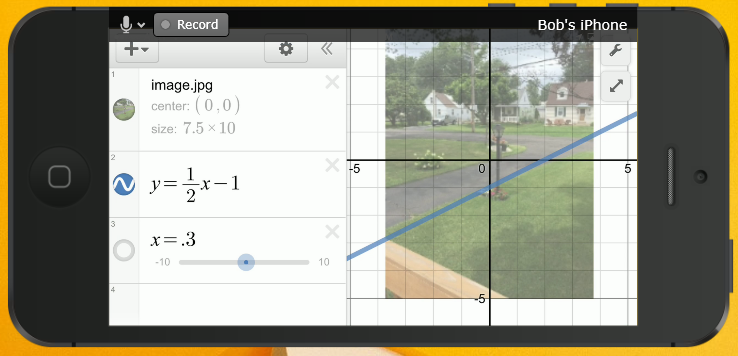
But all of my students have cell phones, and by the end of the first week with me we have used them a number of ways to explore and communicate.  Desmos works remarkably well on a cell phone, kids pick it up immediately, and many have it on throughout class time to use.  While the app is nice, our wifi is quite good so we prefer using the web version. For stats class, Stat Key was a welcome online addition, and allowed for many class investigations.

Q: But don’t your kids end up texting in class?

Yep, kids are generally weasels, when provided the opportunity.  But I recall my own 8th grade math class, where I passed notes constantly.  I’m relieved that none of my teachers told me I had lost paper and pencil privledges over my middle-school note-transit system.

I’m constantly reviewing my classroom management style, and make revisions based on readings and discussions.  I’m confident that handheld devices aren’t going anyplace soon, so I have two options: utilize the technology or bury my head deeper in the sand.  Sure, there are moments where I resort to silly tactics to focus my high schoolers – cell phones face down, corner of the desk, or away altogether.  But making sure students understand responsible use of technology should be build into our classroom mission; I’ll do my part to prepare them for these eventualities.

Q: Do you mandate your students purchase graphing calculators?

This question has many tentacles for me.  I teach honors freshmen, so my suggestion has usually been to consider purchasing a device, learn how to use it well in our courses, and this will put them in a good place for AP Calculus.  Also, I teach AP Statistics, where a graphing calculator is an indispensible tool and I do expect them to have one. (Yes, there are some great individual sites and apps for statistics. But the TI products are still ideal for what we do in AP Stats).  I also have a class set of Nspires, which helps with our non-AP students.

So, the short answer here is a conditional “yes”, but it is becoming much more difficult for me to stand in front of parents at Back to School night and justify the purchase, especially after I discuss the many tools we use in my class.  I also understand that while I am comfortable with many new, free tools, many of my colleagues are not.  I need to consider where I reside in my department’s tech eco-system.

I’m expecting that my answer to this question will shift to a definitive “no” in the next few years.  Until then, some creative solutions, like graphing calculator loan-out programs, may be a way to go.

Q: What about standardized tests?

In AP Stats, students are expected to bring a device to use to the exam, and know how to use it.  So, there is responsibility on my end to ensure that my students have meaningful problems and practice.  There has been chatter of AP eventually moving to an online administration, but I didn’t hear anything concrete about this at last month’s AP reading.  SAT and ACT exams still expect students to bring their own approved calculator devices.  With many of the recent bad press there has been over exam exposure and cheating, I have trouble seeing a scenario anytime soon where any communication devices would be allowed.  Put another notch in the “I still need my students to have a graphing calculator” column.

But if you take a look at some online versions of state and national assessments, you’ll see students provided tools within the test.  And there are some exciting things happening regarding ipads and other non-traditional devices. Texas recently approved the Desmos test-mode app for use on state assessments, where the first attempts at implentation occured recently. Cathy Yenca chronicles her experiences with this on her blog, and you can read more about implentation issues on the Hooked on Innovation blog.

It’s an exciting time to be a math teacher, but also one where some technology growing pains will occur.  Looking forward to hearing what other schools and districts are thinking.

Categories
Uncategorized

Put(t)ing Rational Numbers in Order

Many of my friends and followers have caught onto one of my guilty pleasures: my wierd fascination with The Price is Right (read about Price is Right and counting principles in this old post).  Here’s how a pricing game made for a fun review activity, and also made my life flash before my eyes (read to the end for that).

Here in Pennsylvania, we use the PA Core Standards.  For Algebra 1, here is a standard under “Anchor 1”:

A1.1.1.1.1 Compare and/or order any real numbers.  Note: Rational and irrational may be mixed.

Seems innocent enough.  Here is a sample “open-ended” task used to assess understanding on our state’s Keystone Algebra 1 exam:

image001 (1)

Exciting….now let me go over here and watch the paint dry….

But during the NCTM conference, a lightning bolt hit. I was checking out a putting game at one of the booths, and I suppose rational numbers were on my brain….Hey – Golf + ordering rationals = feels like Hole in One to me!

In the Price is Right Hole in One game, contestants place groceries in order from least to greatest by price.  The number of items they can order until they are incorrect determines where they putt from. After a quick trip to the sporting goods store to find a putting cup, and some time with a Google Doc, we’re all set!

To start, I created a Google Slides presentation with 6 games.  Each game has 6 numbers for students to put in order:

During the game, all students in the class had about 2 minutes to place the numbers in order.  They, we randomly drew our “contestant”, who came to the board to fill in the 6 boxes on the board.

order

Next, we went through the numbers from left to right, and determined how far the contestant had gone in successful ordering.

puttOn the floor, 6 lines were taped.  Line 1 was on the other side of the room, and the lines were closer and closer to the hole. If a student had 4 numbers correctly ordered, they were allowed to putt from line 4.  Two students were able to order all of the numbers and tried their putt from about 2 feet away.

Those who made their putts earned candy to share with their group.  In about 20 minutes, we got through 4 games – not bad for ending a Friday on a fun note.

But be careful! My last “contestant” – one of my less cooperative students and a sometimes hot-head – was able to putt from line 6 with the help of his group.  After missing the first putt, I reminded him that the game is really Hole in One – OR TWO, and had a second chance. Lining up the putt…he took it easy…and missed again.  This is when he raised the putter up and, for a brief second, it looked like the putter could end up flying in my direction.

“Sean, just pick up the ball and put it in the hole….here’s some candy…”

Categories
Uncategorized

Introducing Discovery Hour with Codebreaking

Our school has been on a semester block schedule for over 20 years, with some tweaks made to accomodate building size, AP courses and electives. But this year brought a major schedule change, and an opportunity to think about how we use time to engage students. After periods 1 and 2 (each 75 minutes), all students move into something called HATS period. The acronym stands for Hatters Achieving Targeted Success, and during the period students have a lunch period, along with assigned time with teachers. It’s a great mid-day block for students to touch base with activities and clubs, seek help, make up work, and our RTII team has utilized the time to meet formally with students and facilitate individual help sessions.

I saw an opportunity to engage students in meaningful activities during this time, and have started Hatters Discovery Hour – modeled after the Genius Hour concept many elementary and middle schools offer. My thought is that so many of our teachers have awesome ideas to share which don’t quite fit class time. Also, it’s an opportunity for students to experience teachers they may not cross paths with during their high school career. Let’s build more connections!

The past 2 months have seen some fascinating offerings.  Our No Place for Hate Team has used Discovery Hour to facilitate open discussions on race relations.  Meanwhile, a science teacher shared his experiences working as an EMT in a medical diagnosis session. Juggling was the fun focus of one session, and Discovery Hours on memory systems, photography and meditation are in the works.

THE REAL IMITATION GAME – CRYPTOGRAPHY

For my Discovery Hour session, I shared many of my collected activities on codebreaking. With Oscar season just passed and some simmering interest in the Imitation Game, it was a perfect time to talk about the role of codebreaking through history. Even better, my principal and district curriculum director (and my former boss) were on hand to join in the fun:

I was ambitious, trying to fit 4 codebreaking challenges into the hour. In the end, we had just enough time to keep things moving and hold some fun discussions in these 4 areas. Scroll below to download the handouts.

CRYPTOGRAMS – We started with a basic letter-to-letter cipher. I used a long quote from Bill Gates, which almost turned out to be too long – as I felt a time crunch hitting early. But longer quotes allow more entry points, and I couldn’t pull my principla away from the challenge!

CAESAR SHIFTS – Here we used an online applet to explore shifts, and this provided an entry point for modular arithmetic, which few of the students had encountered before.

HILL CIPHER – By now we had established that the first two coding procedures did not seem too secure. I have shared Hill Cipher with students in my classes before during matrix units, and again a cryptography website was helpful in providing some easy codebreaking trials. When I have done these in class, I often develop problems which get around the modular arithmetic issue (it takes longer to discuss than I often have time for) but we were able to squeeze in a 5-minute mod primer.  See below for other Hill Cipher problems I have used.

THE ENIGMA – The cherry on the sundae, and where many students were stunned by the complexity. This online Enigma simulator is one of my favorites – I love the visual of the wiring. So many good questions concerning inverses, how codebooks were traded and how the British broke the code. I left enough time to show Numberphile’s Enigma video, which capped off the hour nicely.

Looking forward to sharing more of what I know in later Discovery Hour sessions, and thrilled so many of my colleagues are buying into the idea.

View this document on Scribd