Categories
Uncategorized

One-Variable Equations – Let’s Look at Visual Methods

This past week, I worked with 2 Algebra 1A classes, which were working through solving one-variable equations.  By the time of my visit, students had worked through solving equations which had a variable on both sides, some which required students to combine like terms, and some where the distributive property was required.

The students in the class had been exposed to the traditional series of worksheets, drills, and various games to keep the class motivated.  Homework the previous night consisted of problems like the one below:

My challenge to the class was to work with me to think about these one-variable equations differently.  Rather than thinking of the equation as a whole, we have two expressions, one on the left and one on the right.  While by this point in algebra 1 the students do not know how to graph a linear equation, this lesson provides a good opportunity to open that door.  By this point, students do understand that:

  • Expressions can be evaluated, given a value for x, and this provides an output (y).
  • Function tables provide ordered pairs which can be plotted
  • While we often are asked to “plug in” a specific value for x, we can plug any value into most expressions and obtain an output.

So, let’s use this background to our advantage and bring consider a graphical method for solving one-variable equations.  The class I worked with used laptops, and worked through some examples using the Desmos Calculator.  
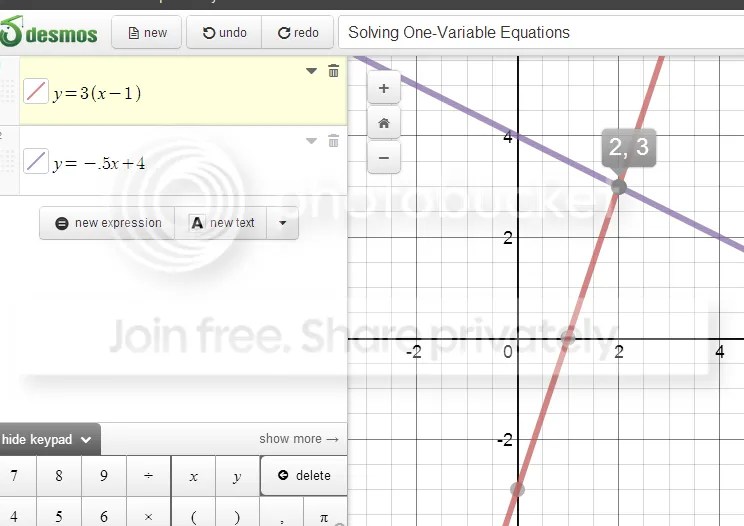
Calculator

Students generally understood that we had strong interest in that point of intersection.  But what does the x represent?  What is the y?  Which one represents the solution we seek?  And what a great review of ordered pairs, more work with functions, and a preview of linear functions.  Students worked through function table with me on this worksheet, and used the grapher to work through problems on their own.

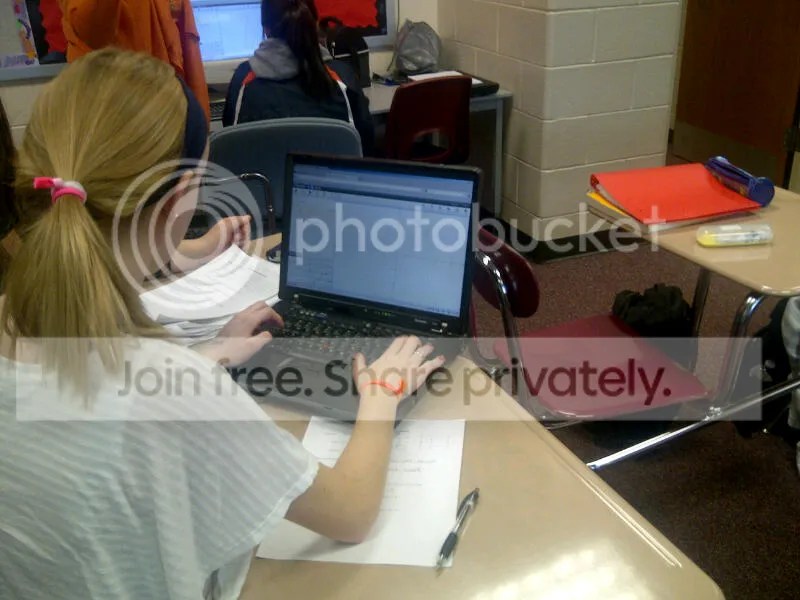
class 1

Class 2

Working with this class produced some rich discussions, particularly when the class was faced with a problem which had no solution, or a problem which had a “messy” solution.  Discussing the parallel lines in teams strengthened the students understanding of “no solution” problems, and problems with messy fractional solutions became possible.

The activity also provided a nice segue to inequalities.  By problem 6 on the worksheet given above, a number of students noted that they could look at when one line was “above” the other.  And some nice foreshadowing of linear systems has been built into early units.

Should students be proficient in traditional algorithms for solving equations?  Of course!  But looking at algebraic ideas using multiple representations often lets students personalize their learning by assessing methods and making connections between tables, equations and graphs.

Categories
Uncategorized

Tech Tools for Math Class

Below is a post I wrote for the blog portion of the Siemen’s STEM Academy website.  The site is filled with lots of great, free, STEM resources for educators, including lesson ideas and archived webinars.  I hope you can find a use for this great information in your classroom!

DISCOVER AMAZING TECH TOOLS FOR MATH CLASS:

It’s the new school year.  You have that new projector and touch board, or maybe you have new tablets for your students.  It’s time to get interactive with your math lessons.  So, what to use to get your students to experience mathematics, and move away from worksheet math?

The National Council of Teachers of Mathematics continues to add applets useful for grades K-12 in its NCTM Illuminations resources area.  The applets run on Flash and include:

  • Algebra Tiles – build, manipulate, and evaluate algebraic models
  • Fraction Models – sliders allow you to explore multiple representations for fractions, decimals and percents.
  • Factorize – explore numeric factors and their relationship to length and width

NCTM has also added a new area of downloadable Common Core Math Tools, which require java to run.  Sample lessons and how-to pages are included to get you started.  In the iTunes store, NCTM has also provided free apps geared towards elementary grades:  Pick-a-Path,  Okta’s Rescue, and Math Concentration.

Desmos Online Calculator – a favorite of mine, a tool I have posted about before, and its care-takers continue to seek your feedback to make this graphing utility better!  It has a fast, simple interface, and you can find maximums, minimums, and points of intersection with a single click.  This tool is ideal for class presentations.  A free registration allows you to save your documents.  Runs great on the iPad!

GeoGebra – a simple tool for interactive geometry, constructions, and measurements, but can provide tables and graphs for algebra class as well.  Works as a java applet, but can also be downloaded as a stand-alone program.  The caretakers are working towards an iPad app.

Sketchpad Explorer – an old favorite, the Geometer’s Sketchpad, moves to the iPad with this free app, available through iTunes.  Students can tap, drag and play with interactive sketches which come loaded with the app, or link to your iTunes store account and upload your own creations to share.

Interactivate – from Shodor, this ever-evolving collection of Java-based courseware has something for all math classes.  Learn about estimation through a virtual model of a forest fire, search for patterns in the multiples of Pascal’s Triangle, or investigate the Mandelbrot Set.

Categories
Uncategorized

Digital Storytelling in Math? Yes Please!

At last week’s STEM Institute, Hall Davidson from Discovery Education facilitated two outstanding sessions on digital storytelling and apps for education, “Putting the STEAM in STEM”.  How can we encourage students in the sciences to tell a story?  Hall offers that storytelling in the sciences should follow a similar structure to all great stories:  Setup – Conflict – Challenge – Climax – Resolution.  Here are some tools which will help you and your students tell your own story.

DSCN0254

PHOTO STORY (for Windows):  This is a free program, which allows users to submit and organize photos, include text, transitions and stock music, and record voice over slides.

Photo Story

The interface is user-friendly, and steps you through all of your options for building your own story.  The example below was made by me to provide context to a quadratics unit.  Think about how your students could fly with this tool and bring personal context to math concepts….I’m sure they’ll come up with better examples than I did!

MOVIE MAKER (Windows Live) – also free, allows for editing and storyboarding of pictures and videos.  If you are a member, Discovery Education provides thousands of great clips you can use and integrate into your own lessons.

PHOTOPEACH – I have mentioned Photopeach on the blog before, but I’ll suggest it again as a great tool for Formative Assessment.    Simply collect and add pictures, and use the quiz feature to create short and snappy reviews.  For a geometry class, have students create their own vocabulary slide shows and share as reviews leading up to the test.

ACTION MOVIE – This free app is available through iTunes.  Choose the movie effect you’d like, record some video, and get your popcorn ready?  How about this is an opener for your algebra class?

Next time, I’ll show off some cool apps for Ipads and Iphones, including green-screen and more storytelling tools.