Categories
Middle School Technology

Estimation with the QAMA calculator

I first heard about the QAMA calculator a few weeks ago, and was immediately intrigued.  The QAMA website advertises its device as

The revolutionary calculator that shows the answer only when you also enter a suitable mental estimate.

That’s a good enough hook for me, so 5 devices were ordered, and I had the first chance to work with a group of students using the QAMA calc.  Students in a 7th grade class rotated through learning stations, where working with me on “percentage of a number” problems were a station challenge.

To start, I had students enter the problem 2.8 x 4.9.  Pressing the equals key, students were not given the answer, and instead must give an estimate of the answer.  An answer deemed “reasonable” will then produce the actual answer.  Here, the students agreed that 3 x 5 = 15 would be a reasonable estimate.

From this introduction, we dove into the first percent problem:  what is 78% of 210.  After writing the problem as a decimal multiplication problem, we brainstormed estimation ideas:  75% is close to 78%, and 200 is pretty close to 210 as well.  This led to discussion on parts of 200:  what is 25%, what is half, how much is 75%.  An estimate of 150 was deemed close enough, and the students were hooked.  Students worked at their own pace through the problems, and were excited when their estimate was considered close enough.
Calc 1

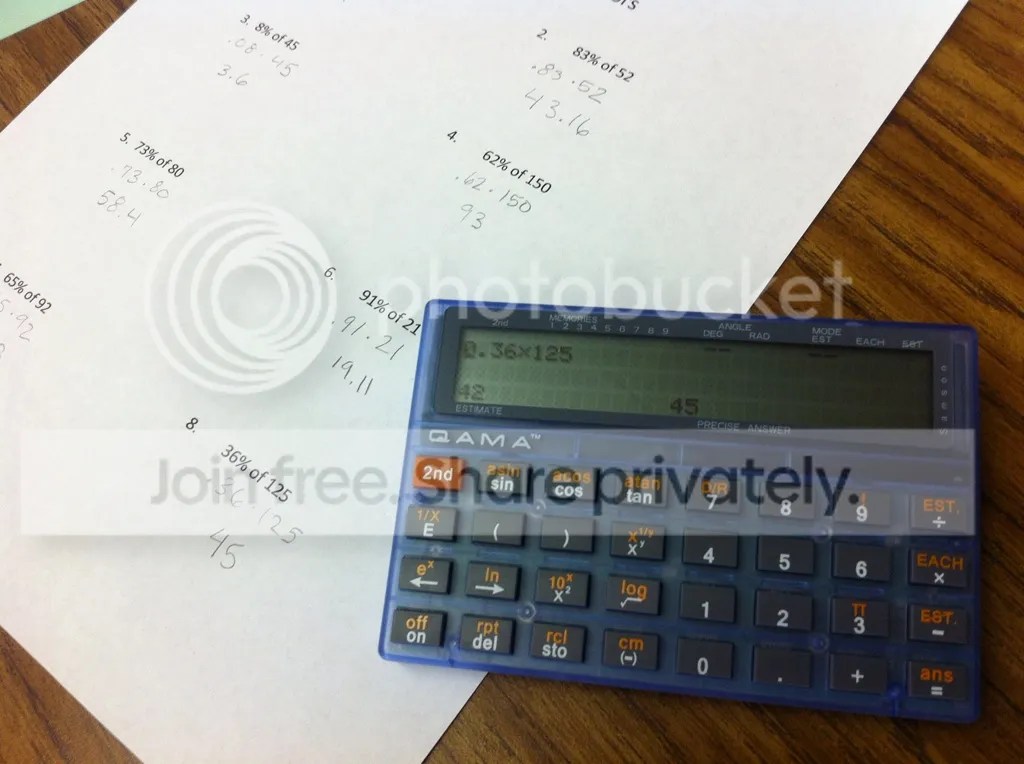
One of the trickier problems, and one which caused the most discussion, was 8% of 45.  After agreeing that .08, rather than .80, was needed here, honing in on an estimate was a tough ride.  Can we find 10% of 45?  How much less do we need to shave off?  The calculator apparently adjusts its tolerance based on the sophistication of the problem, so some close answers were not allowed.

This problem also yielded the strangest accepted estimate of the day:

calc 2

If anyone can figure out the logic here, I’d be interested to hear it.  Insight into the complexity of the estimation algorithm can be found on the company’s website.  EDIT:  as the folks at QAMA explained to me, the calculator will simply give you the correct answer after 5 incorrect guesses.  This particular student was all over the map with his guesses, so I would not be surprised if this photo represents his 5th guess.

Also, one feature I like is that you can shut off the estimation feature, but the calculator has flashing red lights to let the teacher know the feature was disabled.  Pretty sneaky!

But, this was a fruitful activity, which allowed students to communicate their number sense, and verify their estimates.  Looking forward to hearing more stories of the QAMA calculator.

Categories
Middle School

The Take-Away Game

A recent visit to a 6th-grade classroom gave me a chance to introduce a simple game I have used in the past as an-going challenge.  Even after a few pop-ins to this 6th grade class, I am still undefeated, and don’t plan on giving up my championship belt anytime soon!

THE TAKE-AWAY GAME – Rules

On a board, or piece of paper, draw 23 X’s.  Players will alternate turns, and on each turn a player must erase 1, 2 or 3 X’s.  The winner is the player who erases the last X.

It’s an easy game to understand.  An example is given here:

With a class, I will give students a chance to use dry-erase boards and play against each other.  Then, as students begin to understand the game, they are allowed to challenge me.  This usually ends badly (for them), as I know the tricks to the game.  I start by asking the player if they would like to go first, or allow me to go first.  Since kids are usually nice, they will allow me to go first, and this sets them up for certain doom.  Also, I will use my best poker skills to agonize over my moves, though I know exactly where I want to go with my moves.

Eventually, students will gather around to suggest moves.  Their first realization is that if I get the board down to 4 Xs, I will win.  This will then extend to 8 remaining.  With some classes, I have placed a fist behind my back, and done a thumbs-up to signal those watching when I know I have the game won.  Shoot me an e-mail if you need thorough instructions on how to win.

As students master the game, we can ask some extension questions:

  • Does the number of X’s we draw change the game?  What if we use 25, 35, or 50 X’s?
  • What if we could erase 4, 5, 6 or n number of X’s?  How would the strategy change?

For now, play the game with your students, and I look forward to retaining my Inter-Galactic Take-Away Game BeltChampionship Belt!

Categories
Middle School Technology

ATMOPAV 2012 Presentation

What a great day of math sharing today at the ATMOPAV (Association of Teachers of Mathematics of Philadelphia and Vicinity) conference at Strath Haven High School, near Philly.  First, interesting “function dances” and iPad applications on developing function concepts by Scott Steketee.  Then, insights into the Common Core emphasis on functions, with assessment examples from PARCC, from John Mahoney.

In the afternoon, I enjoyed presenting my session, “Encouraging Perseverance in Problem Solving” to an enthusiastic group.  Hope they all find something of value from the session to take back to their schools!  My speaker slides, and some related videos and handouts, are below.


VIDEOS FROM THE PRESENTATION:

Ping-Pong:


Shared-work Problem (Mr. L needs an assistant):


PROBLEM FILES:

Sharp Turn!

Elvis on the Beach

Paths

Donuts